Disclaimer: this is another subject which I do not have any idea about.
Disclaimer 2: Since what I am trying to do is not a full game, but a proof of concept, I am not developing a full interface. In fact, the only interface that I am planing to develop is the in-game interface and maybe a pause menu.
I am just going to talk about the in-game 2D interface. Not menus. Not 3D things. These are the steps I have followed, probably not the best ones, but they made sense in my head.
1. Information of the interface
The GUI has to do mainly two things, give and get information. Now I will describe which information do the software needs to retrieve or represent:
- Give information to the user:
- Health and manna of all the entities in the game, including the own player.
- List of actions that the player can execute.
- Places where the player can execute the action and simulation of the action.
- List of actions that he has decided to execute.
- Time left to end the round.
- Retrieve information from the user:
- Which actions the user wants to execute.
- When is the user ready to send the actions.
2. Layout
In strategy games is really important to give the user all the statistical information he needs to create the best strategy possible, but this data has to be presented in a nice, easy to understand and useful way. For example, one way to represent all the data would be in a really big table, but you will agree with me that this is awful. A better way to represent information like the life of each character would be to use a list of characters, with some kind of identification easy to understand by the player, like a picture and the name of the player, and next to it a health bar. This is a good option, but maybe makes hard to establish a relation between the life of a player and its position in the map. Maybe a better approach is to write the life of he player next to the player in the map. This options also has its problems, for example, does not allow us to have a easy way to count the number of players in the game, but even with that I think is the best option.
About the rest of the layout I am not trying to be creative here. I am trying to use the experience that he has gotten in other games in my favour. In other words, I am copying the layout so it is easier for the user to understand how it works. This is what I have decided to go with:
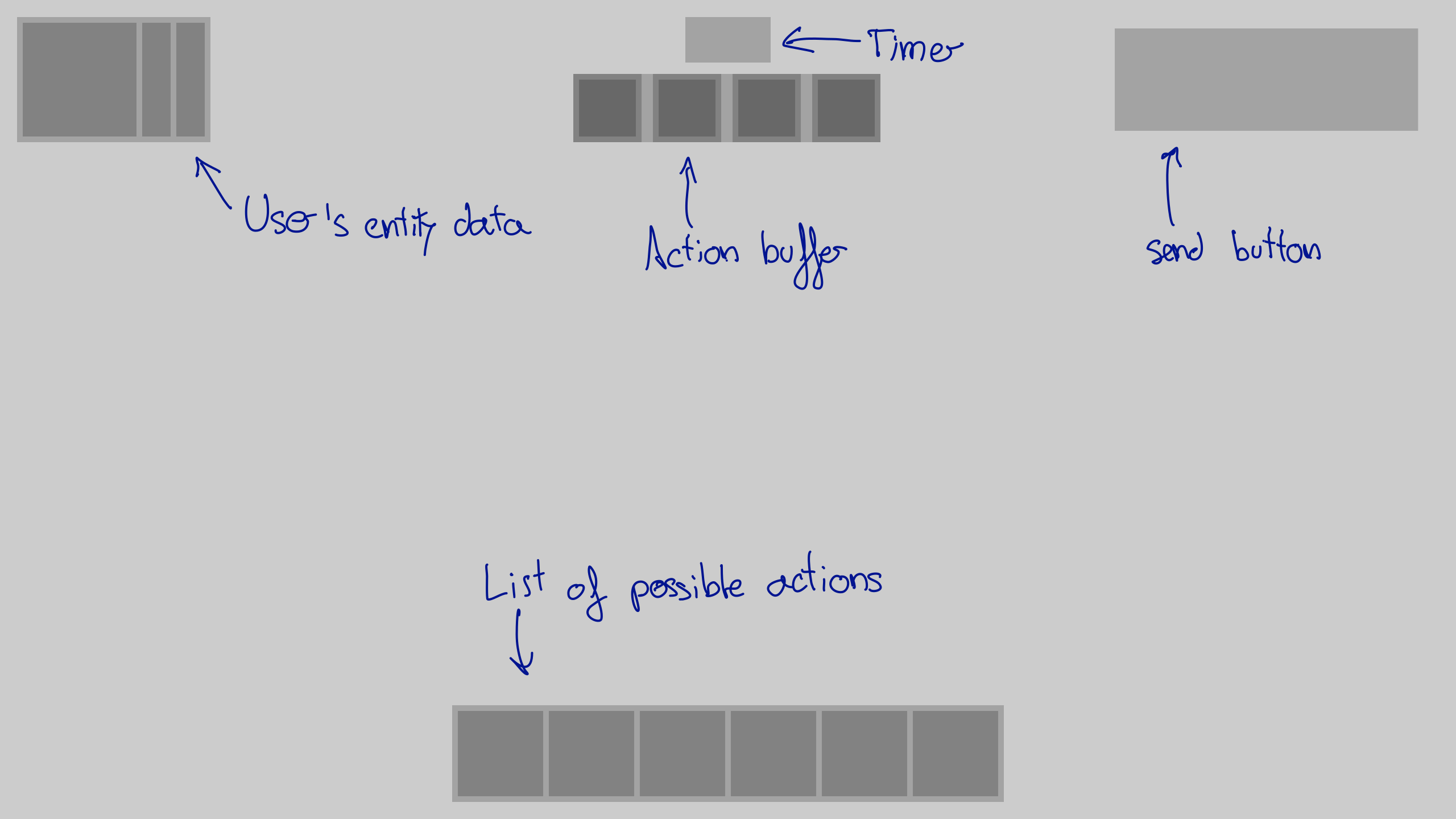
3. Design choices
I have decided to go with pixel art. Why? Mainly because is easy easier than other alternatives. In this video you can find more information about why this choice is so common in indie games.
Then I thought the right choice was to get some beautiful assets. In fact is what I did, but it turns out that since the interface is so specific at the end I created all the elements by myself. That does not mean that the assets I downloaded were not useful. I have say thanks to Kenney for allowing us to use his assets for free.
In the 2D graphics document this part is explained with way more detail.
4. Elements
Now it is time to design the different elements I will need. As a software I started used Gimp.First I tried to use the same measurements that I used in the layout planning image, but they were way too big. Then I tried to make the interface smaller, but then it was too small. This is the result, which I am more or less happy with, but there is still a lot of work to do (I will need to make a third iteration):
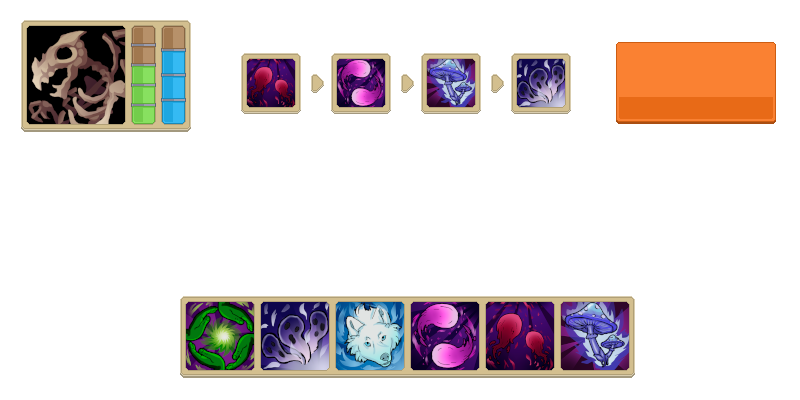
After the second iteration I saw this video about how Pokemon games used a grid system and just 4 colours and discovered that probably this is a better way to work. For the third iteration I want to use a grid system instead of just guessing numbers, this way I just need to create some basic pieces that I will copy and paste in a grid of 8x8 pixels to create all the elements of the interface and if I have to change something it will be faster. For doing this I am using tiled, a open-source and general purpose tile map editor.
Conclusion
I think I need to do a third iteration befor beeing able to use those elements for the MVP. After that I will forget about the 2D graphical elements and focus in the 3D graphics.
P. S.**: a updated information about this topic can be fount in the document about 2d graphics.